
What AI routing actually does
AI routing is the practice of dynamically selecting which model or agent handles a specific request. Instead of sending every prompt through a single, expensive large language model, an AI router sits between your application and multiple model providers. It evaluates the incoming input and forwards it to the most appropriate backend based on real-time data like intent, complexity, and cost constraints.
This approach replaces static rule-based forwarding with intelligent decision-making. Traditional routing might rely on simple keywords or fixed queues. AI routing uses machine learning to understand context, ensuring that a complex coding question goes to a model with strong reasoning capabilities, while a simple factual query is sent to a faster, cheaper model.
Think of an AI router as a traffic controller for your data. Without it, all requests crowd onto the same highway, causing delays and high costs. With an AI router, traffic is distributed across multiple lanes, each optimized for a different type of vehicle. This dynamic selection ensures that your application remains responsive and cost-effective, regardless of the workload.
The result is a system that balances latency and cost without sacrificing quality. By matching the right model to the right task, AI routing tools allow developers to build more efficient and scalable applications. This is the technical foundation for comparing the leading routing solutions of 2026.
Top AI routing platforms compared
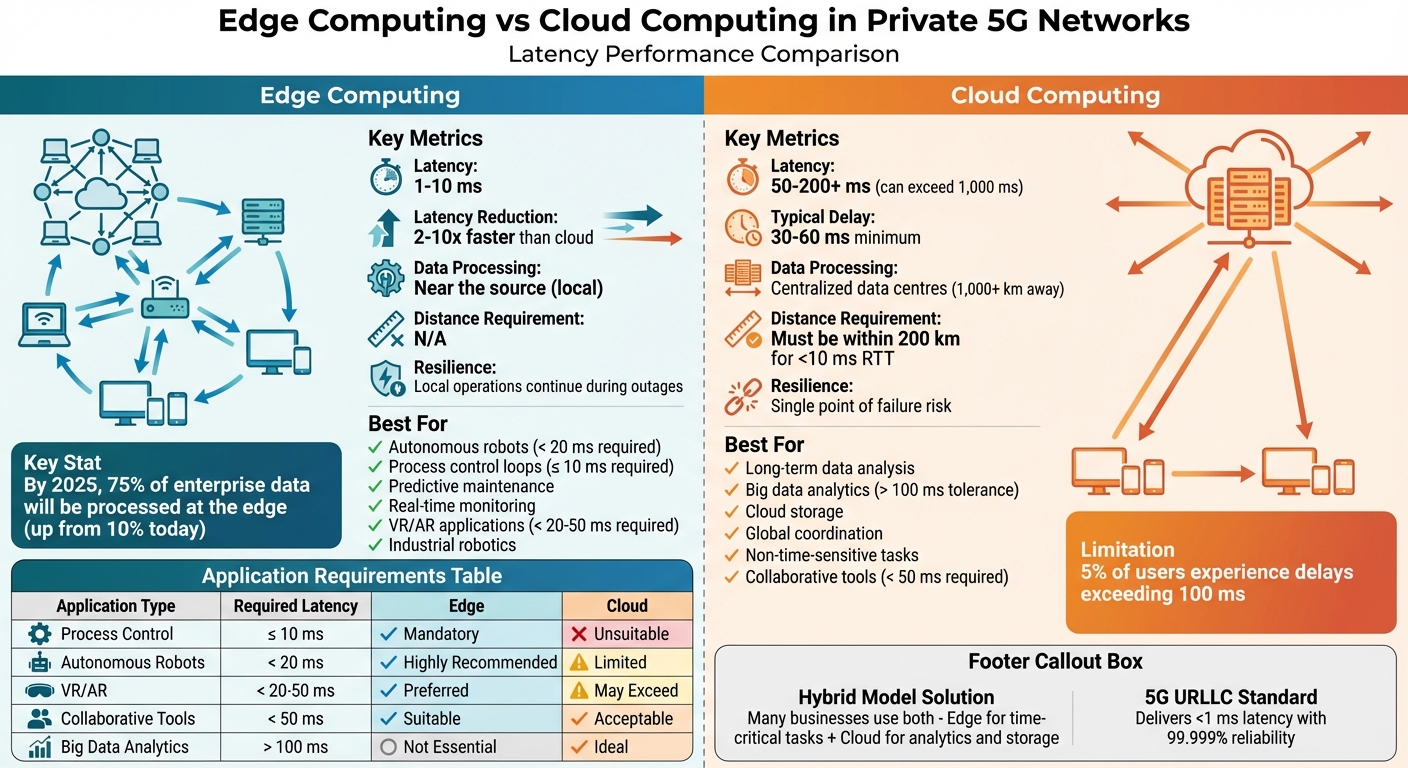
Choosing the right AI router depends on whether you prioritize raw speed, cost reduction, or edge deployment. The market has shifted from simple load balancing to intelligent orchestration, where models are selected based on real-time performance and budget constraints.
The following comparison highlights the core metrics that matter most for production environments: latency, cost efficiency, and edge compatibility. These factors determine how your application handles traffic spikes and manages operational expenses.
| Platform | Avg Latency | Cost Efficiency | Edge Support |
|---|---|---|---|
| RouteLLM | ~50ms | High (Open Source) | Moderate |
| Unify | ~40ms | High | Strong |
| LiteLLM | ~60ms | Medium | Low |
| Portkey | ~55ms | Medium-High | Strong |
RouteLLM and Unify lead in latency-sensitive applications, leveraging open-source frameworks to minimize overhead. LiteLLM offers broader model compatibility but adds slight processing time for its abstraction layer. Portkey balances observability with performance, making it a strong choice for teams needing detailed tracing alongside routing.
Edge compatibility is increasingly critical as models move closer to the user. Unify and Portkey provide robust support for edge deployments, ensuring low-latency responses even in distributed networks. RouteLLM’s flexibility allows for custom edge implementations, though it requires more engineering effort.


As an Amazon Associate, we may earn from qualifying purchases.
How Solver Router cuts edge latency
Standard gateways often stumble when traffic spikes because they rely on static rules or simple load balancing. Solver Router changes this by treating routing as a real-time optimization problem. Instead of guessing where data should go, the system calculates the fastest path for every single packet based on current network conditions.
The mechanism works by continuously monitoring latency, packet loss, and bandwidth availability across all available nodes. When an edge device sends data, Solver Router doesn't just pick the nearest server; it picks the server that can process and return the data fastest, even if that server is geographically further away. This dynamic path selection prevents bottlenecks before they form.
This approach is particularly effective for edge computing environments where milliseconds matter. By predicting congestion and rerouting traffic proactively, Solver Router reduces the round-trip time significantly compared to traditional methods. The result is a smoother experience for applications that require instant feedback, such as autonomous systems or real-time gaming.
The system also adapts to changing network conditions automatically. If a node becomes overloaded or fails, the router instantly shifts traffic to the next best option without manual intervention. This resilience ensures that your applications remain responsive even when the underlying network is unstable.
Choosing the right router for your stack
An AI router sits between your application and multiple model providers, acting as the traffic controller for your infrastructure. It doesn't generate content itself; instead, it dynamically selects which model handles each request based on cost, latency, and complexity. Getting this layer right is the difference between a responsive app and a bloated bill.
Model diversity and fallback logic
Not every user query requires GPT-4o. Simple intent classification or factual lookups run faster and cheaper on smaller models like Llama 3.8b or Mistral 7b. A robust routing setup uses a lightweight classifier to triage requests, sending only complex reasoning tasks to your premium models.
This tiered approach also improves reliability. If your primary provider experiences downtime or rate limits, the router can instantly failover to a secondary model. This redundancy ensures your application stays online without manual intervention.
Cost constraints and latency choices that change the plan
Latency and cost are often at odds. Directing every request to the fastest, most expensive model will drain your budget. Conversely, forcing all traffic through the cheapest model will frustrate users with slow or inaccurate responses.
Evaluate your specific use case. If you are building a customer support bot, accuracy is paramount. You might accept slightly higher latency for better answers. If you are processing internal documents, speed and cost matter more. Align your routing rules with what your users actually value.
Infrastructure requirements
Your existing stack dictates which router fits best. Some routers integrate directly into your codebase as a library, giving you full control over the decision logic. Others operate as a managed service, handling scaling and provider negotiations for you.
Consider the maintenance burden. A self-hosted router requires you to manage updates and provider API changes. A managed service offloads this work but may introduce additional network hops. Choose the architecture that matches your team's capacity to manage infrastructure.

As an Amazon Associate, we may earn from qualifying purchases.
Frequently asked questions about AI routing
What is routing in AI?
AI routing is the automated process of directing data or customer inquiries to the correct destination using machine learning. Instead of following static rules, these systems analyze context and intent in real time to match each request with the most suitable agent or specialized AI agent.
What is AI call routing?
AI call routing replaces traditional IVR menus and basic queues. It uses real-time data and predictive models to understand a caller's intent immediately. This ensures the interaction is directed to the agent or department best equipped to resolve the issue, reducing wait times and improving first-contact resolution.
How does AI routing reduce latency?
By analyzing the specific needs of an inquiry before it reaches an agent, AI routing eliminates unnecessary handoffs. It directs traffic to the most efficient path, whether that means sending simple queries to automated agents or complex issues to human specialists. This precision minimizes the time spent waiting in queues or being transferred between departments.
Is AI routing more expensive than traditional methods?
While the initial setup requires investment, AI routing often lowers long-term costs. By automating routine tasks and improving agent efficiency, businesses reduce the need for large support teams. The cost savings come from higher resolution rates and reduced operational overhead, making it a cost-effective solution for scaling customer service.
No comments yet. Be the first to share your thoughts!